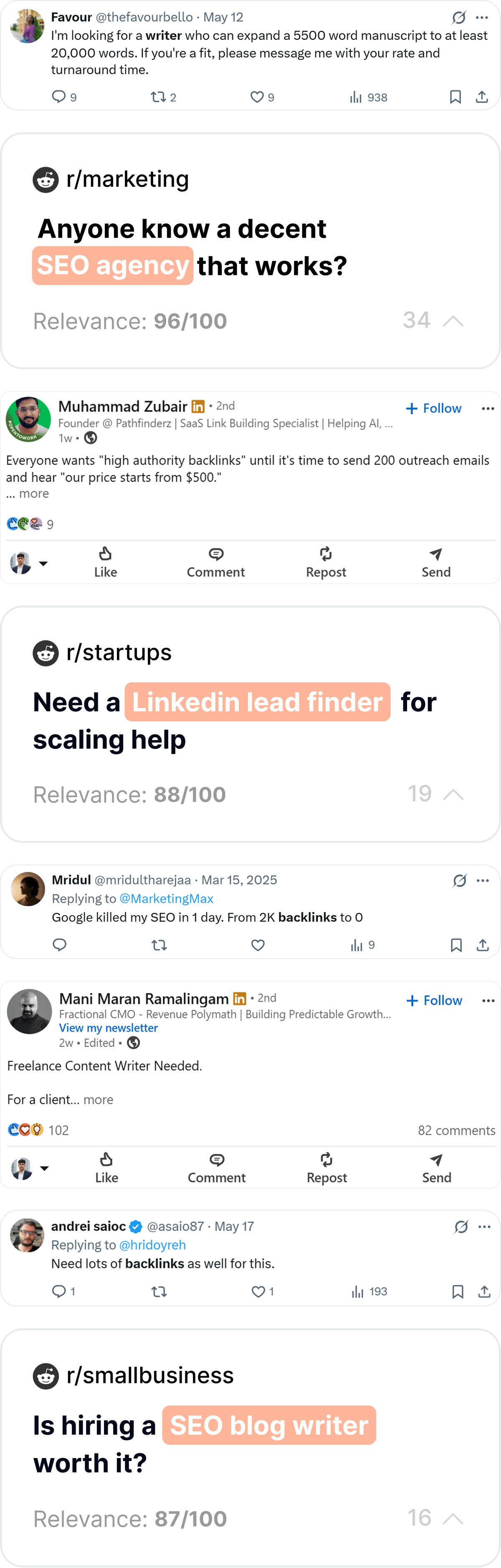
Why LinkedIn outreach fails for most founders — and why yours won't
LinkedIn has over 1 billion members. Nearly every B2B buyer you'll ever want to reach has a profile there. So why do most founders get a 2–3% reply rate on their outreach — and treat that as normal?
Because they're doing it wrong. Not slightly wrong — fundamentally wrong. They're sending mass messages to people they don't understand, about problems they haven't confirmed, with offers that aren't relevant to who they're contacting. Then they wonder why their carefully crafted message sat unread for 3 weeks.
The founders who use LinkedIn to land their first 10 paying customers do something entirely different. They start with intent signals — people who are already expressing the problem — instead of job title lists. They personalize at a level that makes recipients think they were being watched. And they offer something valuable before they ask for anything.
The 3 core failures of bad LinkedIn outreach
Failure 1: Starting with a list, not with intent
Most founders build a list of people with the right job title and blast them with messages. The problem: having the right job title doesn't mean you have the right problem right now. A VP of Sales who's perfectly happy with their current stack isn't a buyer. A VP of Sales who just posted "our pipeline tracking is a disaster" is a buyer this week. Start with intent, not demographics.
Failure 2: Leading with the product, not the problem
"Hi [Name], I'm the founder of [Product] and we help B2B teams with [thing]. Would love to show you a demo." This message is about you. Your potential customer doesn't care about you — they care about their problem. Lead with their world, not yours. Show you understand what they're dealing with before you mention what you've built.
Failure 3: Asking for too much, too fast
The first message asks for a demo call. That's asking a stranger to give you 30–45 minutes of their time before you've given them any reason to trust you. Start with something smaller: a reply, a thought, a quick question. Build micro-trust first. The call comes later, when they've already decided you might be worth talking to.
Stop thinking of LinkedIn outreach as a numbers game (send 500 messages, get 10 replies, book 2 calls). Start thinking of it as a relevance game. 20 perfectly targeted messages to people who have the problem right now will outperform 500 generic ones every single time. The best founders do fewer outreaches, not more.
Finding high-intent LinkedIn leads before your competitors do
The best LinkedIn leads aren't the ones with the right title — they're the ones with the right problem, right now. Here's exactly how to find them.
Method 1: Post keyword search (the most underused feature on LinkedIn)
When you search on LinkedIn, switch the results filter to "Posts" instead of "People." Now search for your problem keywords. You're not looking for people — you're looking for conversations happening right now about the problem you solve.
HIGH INTENT (search these first):
"looking for [tool/solution category]"
"recommendations for [type of software/tool]"
"switching from [competitor]"
"[competitor] alternatives"
"frustrated with [problem area]"
"we tried [solution] and it didn't work"
"finally solved [problem]" (find the person — they'll respond to someone with a better solution)

MEDIUM INTENT:
"struggling with [problem]"
"anyone else deal with [challenge]"
"how do you handle [workflow]"
"what tools does your team use for [X]"

RESEARCH INTENT (useful for content strategy):
"thoughts on [category]"
"[industry] trends"
"[topic] insights"
Method 2: Comment section mining
Here's a secret: the person who posts about a problem gets all the attention. But the people who comment "same issue here" or "we've been struggling with this for months" are equally qualified leads — and they haven't been targeted yet.
Find a high-engagement post about your problem space
Search for your problem keywords in Posts mode and look for posts with 20+ comments. High engagement signals strong resonance — many people have the same problem as the original poster.
Read every comment and identify problem-confirmers
Look for commenters who are saying "yes, this is exactly our problem too" or who are adding their own experience with the pain. These are confirmed ICP matches who have just self-identified publicly.
Click through to their profiles and qualify them
Check their job title, company size, and industry. If they match your ICP, they're a warm lead — you have a specific shared context to reference in your outreach: the post they both commented on.
Engage with their content before you message
Before sending a connection request or DM, leave a thoughtful comment on one of their recent posts. This creates a touchpoint that means your name won't be completely unfamiliar when your connection request arrives.
Method 3: Competitor dissatisfaction mining
Search for posts mentioning your competitors with negative sentiment. "We've been using [Competitor] for 6 months and the reporting is terrible." That person is actively dissatisfied with a paid solution. They have budget. They're looking for an alternative. This is the highest-intent lead type on LinkedIn.
LinkedIn posts lose engagement velocity after 24–48 hours. If someone posts a problem and you're the first to respond with a genuinely helpful comment within the first few hours, you get disproportionate visibility. EarlyCustomers.com monitors LinkedIn for intent signals in real-time so you can act in this window — before your competitors even see the post.
Method 4: Sales Navigator intent filters
If you have access to Sales Navigator, these filters find your highest-intent prospects:
- Changed jobs in last 90 days — people in new roles have buying mandates and fresh budgets; they're building a new stack and open to everything
- Posted on LinkedIn in last 30 days — active posters are engaged users who will see your message and respond
- Company headcount growth 10%+ in last year — growing companies have expanding problems that need new tools
- Following your competitors' company pages — direct signal of category awareness and intent
- Keywords in posts + title + company size combined — the triple filter that gives you extreme ICP precision
Your LinkedIn profile: the silent sales page they check before they reply
Before anyone replies to your message, they look at your profile. In 8 seconds, they decide whether you're credible or noise. Most founder profiles fail this test completely.
The 5 profile elements that determine whether you get replies
Your headline: not your title, your value proposition
Most founders write "Founder & CEO at [Company]" in their headline. That tells your prospect nothing about why they should care. Instead, write the outcome you create: "Helping early-stage SaaS founders find their first 10 paying customers without cold lists" is a headline that makes your ICP stop scrolling.
Your profile photo: professional, approachable, high-resolution
Not your vacation photo, not your logo, not a cartoon. A clear, well-lit headshot where you're smiling. LinkedIn data consistently shows that professional headshots get 14× more profile views than non-photos. Your profile photo is the first thing people see when you send a connection request.
Your About section: write it for them, not about you
The About section is where most founders write their founder story ("I spent 10 years in enterprise software and decided to build something..."). Your prospect doesn't care about your journey — they care about whether you understand their problem. Start with the problem your ICP has. Then describe the solution. Then add one line of credibility. End with a call to action.
Featured section: proof, not decoration
Use the Featured section to link to your best content piece, a case study, a free resource, or your product landing page. This gives prospects who are intrigued something to explore before deciding whether to reply. A well-placed link to a genuinely useful resource (like this guide) dramatically increases the chance they engage with you.
Recent activity: show you're a real person with real opinions
Post at least once per week. Your prospect will check your recent activity to see if you're active and what you talk about. If your last post was 3 months ago, they'll wonder if you've given up. If you're posting about the problem space they're experiencing, you immediately have credibility as someone who understands their world.
The connection request that actually gets accepted
Your connection request is the first message your prospect sees. Most founders waste it with "I'd like to connect" or no note at all. Here's how to turn it into your first touchpoint.
The anatomy of a connection request that gets accepted
LinkedIn gives you 300 characters for a connection note. Use them. A connection note that references something specific about the person dramatically increases acceptance rates — from ~25% for blank requests to 60–70% for personalized ones.
A great connection note contains at least one specific: a specific post they wrote, a specific comment they made, a specific problem they mentioned. Generic notes ("I saw your profile and think we could synergize") convert at near-zero. Specific notes convert at 60–70%. The research is worth it.
Writing cold messages that get real replies
Your connection was accepted. Now you need to send a first message that doesn't make them regret it. Here are the principles that separate 27% reply rates from 2%.
The 5 laws of high-converting LinkedIn messages
Law 1: Lead with their world, not yours
The first sentence of your message should be about them — their situation, their challenge, something they said. Not about you, your product, or your company. People respond to things that feel like they're specifically about them, not generic blasts dressed up with their first name.
Law 2: Be short enough to read in 20 seconds
LinkedIn DMs aren't emails. Three paragraphs of context and background is too much. Your message should be readable at a glance — 4–6 sentences maximum. If you can't make your point in 6 sentences, you don't understand your point well enough yet.
Law 3: Make one ask — and make it tiny
Don't ask for a call in your first message. Ask for a reply. "Does this resonate?" or "Would you be open to me sharing what we've found?" are micro-asks that require minimal commitment. Once they reply, you've opened a real conversation. The call comes later.
Law 4: Give something before you take anything
The highest-converting LinkedIn messages offer value before asking for anything: a relevant resource, an insight from your research, a framework that addresses their problem. This positions you as a knowledgeable peer rather than a salesperson. People respond to peers. They ignore salespeople.
Law 5: Write like a human, not a press release
No jargon. No corporate language. No "I hope this message finds you well." Write the way you'd write to someone you met at a conference: casually, directly, with personality. If your message sounds like it could be sent to 500 people, it will convert like a message sent to 500 people.
Message templates for every LinkedIn scenario
These templates are designed to be personalized — each has a [bracket] where you insert specific context. The brackets are not optional. Generic fills get generic results.
Template 1: The high-intent post response
Use when: They posted about your problem space in the last 7 days.
Template 2: The competitor dissatisfaction DM
Use when: They posted or commented negatively about a competitor you can replace.
Template 3: The mutual context opener
Use when: You share a community, event, or mutual connection that gives you credibility.
Template 4: The insight-led opener (no cold feel)
Use when: You have genuinely useful research or data about their problem space.
The follow-up sequence that doesn't feel like spam
Most people don't reply to your first message because they were busy, not because they're not interested. The right follow-up system converts 40% more of the leads you've already found.
The 3-touch LinkedIn follow-up sequence
Follow-up 1: Add a new piece of value
Don't just say "just following up on my last message." Bring something new: a relevant article, a framework, a short summary of something you learned this week that's relevant to their problem. This gives them a reason to open the message even if they didn't engage with the first one. Example: "Hey [Name] — also wanted to share this guide we published this week on [problem] — might be relevant to what you were dealing with."
Follow-up 2: Make it easier to say yes
Acknowledge that timing might be off and lower the barrier even further. "I know things get busy — if this isn't a good time or it's not relevant, just let me know and I won't bug you again. If it is, I'm happy to share a 2-minute Loom of exactly how we approach [their problem] — no call required." The "Loom alternative" offer converts surprisingly well because it's lower friction than a call.
Follow-up 3: The clean break (that often gets the reply)
Send a final message that gives them permission to say no — but often prompts a yes. "Hey [Name], last message from me on this — didn't want to be annoying. I completely understand if it's not a fit or timing is off. If you ever find yourself back in [their problem space], feel free to reach out. Wishing you and [company] well." This message gets replies at a disproportionately high rate because it's human, not pushy.
Follow-up 3 (the clean break) is often the message that gets the reply. When you take away the pressure and wish someone well, they suddenly don't feel cornered — and they respond. A "not right now but let's talk in Q4" reply from a clean break message is still a win: you're in the pipeline.
Content-led LinkedIn outreach: warm prospects before you ever message them
The most effective LinkedIn outreach isn't cold — it's warm. Content gives you a way to have your ideal customers find you, engage with you, and see you as a trusted voice before you ever send a single DM.
The content → comment → DM funnel
Here's how content-led outreach works:
Post content that attracts your ICP
Write posts about the problem your ICP has — not about your solution. "3 reasons most founders' outreach gets ignored" attracts founders struggling with outreach. "How we found 50 high-intent leads in 1 hour without cold lists" attracts founders actively searching for lead gen methods. These posts pull your ICP to you without any cold outreach at all.
Turn commenters into warm outreach targets
When someone comments on your post with something substantive ("yes this is exactly our problem too"), they've self-qualified as your ICP and signaled that your content resonated. Now you can send a connection request or DM that feels completely natural: "You mentioned [their comment] on my post — would love to continue that conversation."
Comment strategically on your ICP's posts before you DM
Before you message anyone cold, leave a genuinely helpful comment on 1–2 of their recent posts. Not "great post!" — something that adds a perspective, shares a relevant experience, or asks a thoughtful question. Now when your DM arrives, they recognize your name. That's the difference between 5% and 30% reply rates.
What to post on LinkedIn to attract your ICP
| Post Type | Why It Works | ICP Attraction Level |
|---|---|---|
| Counter-intuitive insight about their problem | Challenges assumptions; gets comments from people who agree or disagree | Very high |
| Specific tactical how-to (numbered list) | Immediately useful; shared widely; signals expertise | High |
| Before/after: "We used to do X, now we do Y" | Relatable journey; builds trust through vulnerability | High |
| Question to your ICP ("How do you handle X?") | Invites engagement directly from your target audience | Very high — direct comment mining |
| Founder update / product milestone | Builds narrative; attracts people who want to support founders | Lower — attracts supporters, not buyers |
| Inspirational quotes / generic motivation | High likes, low ICP signal | Very low — vanity content |
Tracking what works — and scaling it
Founders who treat LinkedIn outreach as "send and hope" never figure out what's working. Founders who track everything find their winning formula in 3–4 weeks and then scale it.
The minimal LinkedIn outreach tracking system
Name | Company | Title | Company Size | Source (how you found them)
Connection sent | Connection accepted (Y/N) | Date accepted
First message sent | First message replied (Y/N) | Reply date
Follow-up 1 sent | Follow-up 1 replied (Y/N)
Follow-up 2 sent | Follow-up 2 replied (Y/N)
Call booked (Y/N) | Call date | Outcome
Notes: [what message version did you use? what was their trigger?]

Weekly summary (review every Friday):
- Total connections sent this week:
- Acceptance rate (accepted / sent):
- Reply rate (replied / connected):
- Calls booked:
- Observations: [what seems to work this week?]
The 3 metrics that tell you if your LinkedIn outreach is working
- Connection acceptance rate — target >50%. If below this, your connection notes aren't personalized enough or your profile isn't credible enough. Fix the profile first, then the notes.
- First message reply rate — target >20%. If below this, you're either messaging the wrong people (wrong ICP) or leading with the wrong angle. Test different opening lines and track which performs better.
- Call booking rate from replies — target >40% of replies becoming calls. If people are replying but not booking calls, your transition from conversation to call request needs work. Make the ask smaller or provide more value before asking.
From LinkedIn lead to your first paying customer
LinkedIn warms the lead. The conversion happens in the conversation. Here's how to close the loop.
The discovery-to-close framework
Book the call with a specific agenda
"I'd love 20 minutes to show you how we're solving [specific problem they mentioned] — I'll cover what we've built, what's working, and get your honest take on whether it fits your situation" is better than "Can we jump on a call?" Specific agendas get higher show rates because the prospect knows exactly what they're getting into.
Open the call with their problem, not your demo
The first 5 minutes of the call should be all them. "Before I show you anything — help me understand your current situation with [problem]. What does a bad week look like?" The more they talk first, the more relevant your demo becomes. And the more relevant your demo, the higher the close rate.
Give a tailored demo, not a feature tour
Only show the parts of your product that are relevant to what they just told you. "You mentioned X is the biggest problem — let me show you exactly how we handle that." Skip everything else. A 10-minute focused demo outconverts a 40-minute feature tour every single time.
End with a decision, not a follow-up
"Based on what you've told me, does this seem like the right fit for where you are right now?" Ask for a clear yes, no, or "what would need to be true for this to be a yes." Ambiguous "I'll think about it" outcomes are fixed by better closing questions, not more follow-up emails.
How EarlyCustomers.com makes LinkedIn outreach 10× more efficient
Everything in this guide requires significant time: monitoring for intent signals, profiling leads, personalizing messages, tracking activity, following up. EarlyCustomers.com automates the heaviest parts:
- Intent-based LinkedIn lead discovery — find people posting about your problem space right now, scored by buying intent
- Profile context extraction — get job title, company size, and signal summary for every lead automatically
- AI-drafted personalized messages — get a customized first message drafted for each lead, based on their specific post and profile
- Real-time alerts — get notified the moment a high-intent LinkedIn post appears so you can respond in the critical first-hour window
- Competitor tracking on LinkedIn — know instantly when someone posts about your competitors being frustrating or mentions looking for alternatives
- Cross-platform ICP matching — correlate LinkedIn signals with Reddit and X data to find your highest-confidence leads across platforms
LinkedIn outreach that starts with intent, not a list.
EarlyCustomers.com finds people on LinkedIn who are actively expressing the problem you solve — scored by buying intent, with AI-drafted personalized messages ready to send. No cold lists. No guessing. Just warm outreach to people who need you now.
Find LinkedIn Leads Automatically → See pricing